17 October 2026, Shenzhen
Not a “prompt talk”
How I actually build learning websites with AI
Who I am
Design teacher. Not a developer.
Part one
Things I’ve made
01
[Resource 1]
[The problem it solves]
[How long it took]
02
[Resource 2]
[The problem it solves]
[How long it took]
03
[Resource 3]
[The problem it solves]
[How long it took]
Part two
Not prompts. Structure.
What the AI is allowed to do, and where the work lives.
On the left you are the hands. On the right you are the editor.
It plans before it types.
Read the thinking when something goes wrong. It shows you what it misunderstood.
Permanence is the point
A chat disappears. A repo remembers.
A chat has a memory limit, a context window. A repo keeps every file and every saved change.
Real commits from my trivia night repo.
On your device, or in the cloud.
My laptop
A local session sees my files and opens a live preview.
The cloud
A cloud session starts from a browser or my phone, works on a copy, and sends it back.
Part three
You’re looking at the example.
This site did not exist on 15 October. Here is every step, with the real files.
> I'll start with cloud.contrapaul.com and a question. Following that I'll switch tabs and jump to build.contrapaul.com, which will be a new website that is both a presentation and a guide.
> I want to have a multi-tab page ... with the ability to use keyboard shortcuts (arrows) to move between each full screen page element as if they are slides, but the tabs can also be scrolled through conventionally.
> The style/inspiration is slick motion graphics, with the feel of being sliding through/scrolling through a video showcase.
The build
First session: the tabs, the frames, the keys. It ran the page, looked at it, and fixed its own mistakes before showing me.
Then it’s mine
Some changes I typed myself. Some I described. This is where most of the time goes, and it’s the fun part.
2103c0fThe talk, the guide and the projectsOct 15b393647Frames, clicker keys, router and motionOct 15aa9ff50Glossary: 52 terms, hover cards, deep linksOct 15e8caf45Fonts, QR encoder and the slop posterOct 15f9a3d9bStart build.contrapaul.com: plan, rules, handoffOct 15
Live on Cloudflare
A static site is just files. Connect the repo once, and every push goes live in about a minute. On my own domain, it works in China.
- Workers & Pages, Create, Pages, Connect to Git
- Pick the repo
- Leave the build settings blank
- Deploy
- Add the subdomain: build.contrapaul.com
Part four
What matters more than prompts.
Habit: be specific
Name it. Describe it. Say what done looks like.
Make the video bigger and nicer.VAGUE
The video should load first in a player that fills ~90+% of either horizontal or vertical dimensions, depending on video size. Once it ends I’d like it to dissolve/fade... and have the question load in, filling much of the screen but leaving breathing room.SPECIFIC: MY TRIVIA PROJECT
Habit: write the rules down
Class rules, for the agent.
Every rule says why. Same mistake twice, and it becomes a rule.
Nothing is fetched from another host, ever. Fonts are in public/fonts. No CDN, no Google Fonts. Those are unreachable in China and a blocking request to a dead host stops the page in front of a room full of people.

Do not add questions. TBD in the data means Paul has not settled it.

Legible from the back of the room. Every screen is judged at a distance. Bigger is better. Nothing depends on hover.
A rule I hold myself to: no AI art
An AI poster, warning you about AI.
- Slogans that come in threes
- “In today’s fast-paced world”
- An em dash, in the advice on how to spot AI writing
- A QR code that goes nowhere, on a poster about fake sources
Students notice.Students know.Students judge.
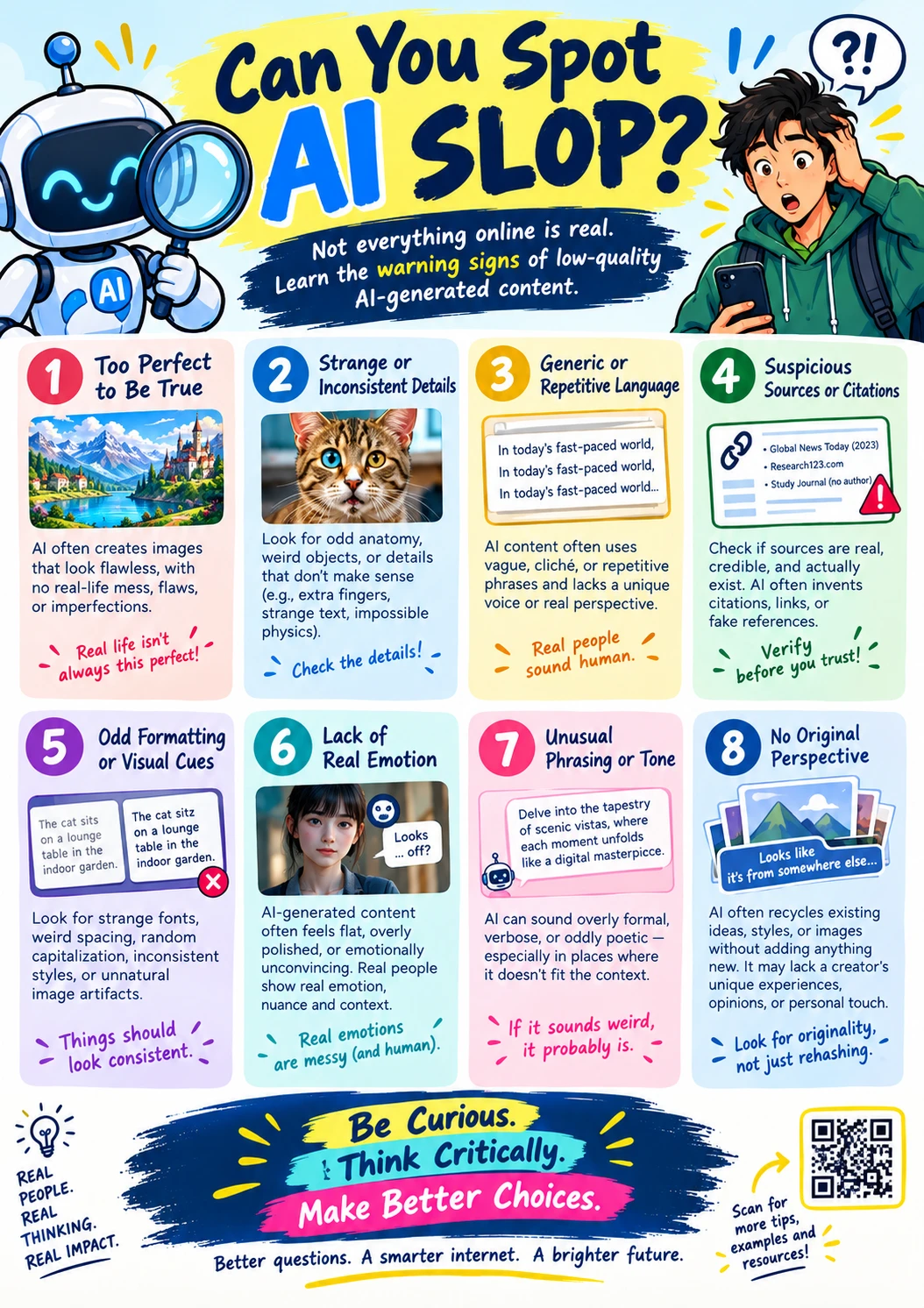 AI-generated: shown as an example
The other side
Tell students what AI made, and why.
When they see how it was used, and what it made possible, they buy in. We ask students for AI disclosure. We should model it.
Habit: write it down, and make the agent keep it
Brief first. Plan next. Handoff always.
The agent forgets everything between sessions. The handoff file is its memory, like a cover note for a substitute.
- Status at a glance
- Ground rules
- Gotchas that have already bitten
- Open items
- Working with Paul
After every change that works, add a dated entry to the top of the log in HANDOFF.md: what was asked, what was built, what was decided and why, and what is still unverified. Update the status section if it changed. Do this before saying you are finished.
Habit: reuse what works
“We already have one of those.”
curriculum.jsA story
Fixing it live, in class.
Quick tips
- Start with something you needNot something impressive. Need makes you specific.
- One change at a timeCheck it yourself.
- When it works, commitUndo is free. Use it.
- Ask “what is this called?”And “explain what you just did.”
- No student data, everNo accounts, no names.
- Read the thinkingWhen it goes wrong, that’s where the clue is.
Your turn
Questions, or play.
If there is time
One more thing.
One small change to this site, live. Commit, push, and reload in about a minute.
Start here
Your first site, live.
A one-page website at your own address, built with an AI coding agent. About an hour the first time. Scroll, or use the arrow keys.
What you need
- A GitHub account. Free.
- A Cloudflare account. Free.
- An AI coding agent: Claude Code, OpenAI Codex, GitHub Copilot, Cursor or Gemini CLI. Most need a paid plan. Any agentic one will do.
- Optional: your own domain, about the price of a coffee a year.
Pick something you need
Not something impressive. Need makes you specific.
- A quiz for one unit, with an explanation for each wrong answer
- A sorting activity: drag terms into groups
- A countdown to an exam or event
- A helper for writing report comments from your own phrases
Write a one-page brief
Before any code, answer four questions in plain language. That is your brief.
- Who uses it?
- Where? A projector, a phone, a school laptop. Say which screen.
- What does done look like? “A student on a phone can finish it without scrolling sideways.”
- What must it never do? “Ask for names.” “Load anything from another website.”
A template is at the end of this page.
Build it in the browser
The easiest first route: nothing to install.
- On GitHub, create a new, empty repo.
- Open a cloud session on it (for example, claude.ai/code).
- Paste your brief and ask: “Write a plan for this. Don’t write code yet.”
- Read the plan. Change what is wrong. Approve it.
- Ask it to build, and to add a CLAUDE.md and a HANDOFF.md using the templates below.
- Review what it made, then merge it into your main branch.
On your own computer instead? Install your agent, clone the repo, and follow the same steps in a local session, with a live preview.
Publish it
- In Cloudflare: Workers & Pages, Create, Pages, Connect to Git.
- Choose your repo.
- Leave the build settings blank. A static site needs none.
- Save and Deploy. You get an address within a minute.
- Optional: Custom domains, then add a subdomain of your own domain.
From now on, every push goes live by itself.
Make it yours
- One change at a time. Check it yourself.
- When it works, commit.
- Don’t know what something is called? Ask. Then use that word.
- Same mistake twice? Add a rule to your rules file.
- Something wrong? Read the thinking to see what it misunderstood.
Before you share it
- No student data: no names, no accounts, no tracking.
- Add a license, so people know what they may reuse.
- Add an AI disclosure line: what AI made, what you did.
- No AI images. Use your own, your students’ (with credit), or none.
- Open it on a phone.
Working from mainland China
- Most AI coding tools need a VPN.
- GitHub works, but can be slow.
- Cloudflare Pages on your own domain loads normally.
*.pages.devandgithub.ioaddresses often don’t. - Keep everything in the project: no Google Fonts, no CDNs.
Starter files
Copy these into your repo. They work with any agent. Some agents look for AGENTS.md instead of CLAUDE.md: check which yours reads.
# Brief: [name]

## Who uses it
[Students in grade X / colleagues / me on a projector]

## Where
[Projector at 16:9 / phones / school laptops]

## What it does
[Two or three sentences]

## Done looks like
- [A student can ... without ...]
- [It loads in under ... on school wifi]

## Must never
- Ask for names or accounts
- Load anything from another website
# Handoff

Newest entry at the top. The agent updates this after every working change.

## Status
[One paragraph: what works, what does not yet]

## Open items
- [ ]

## Gotchas that have already bitten

## Log
### [date]: [what changed]
# Rules for this project

Read BRIEF.md and HANDOFF.md before changing anything.

- No student data. No names, no accounts, no tracking. Why: this is public.
- Nothing is loaded from another website. Fonts and scripts are saved in
  the project. Why: blocked sites stop the page loading.
- One change at a time, and say what you changed. Why: I need to check it.
- Ask before guessing. If the brief does not say, ask me.
- After every change that works, add a dated entry to the top of
  HANDOFF.md: what was asked, what was built, what was decided, and what
  is still unchecked. Do this before telling me you are finished.
Where next
See what it can become.
The Projects tab has everything from the talk. For students learning to code with AI, there is a bilingual guide at make.contrapaul.com/tools/codewithai.
Projects
Things I’ve made.
All built with an AI coding agent, for real classes. Open them, try them, borrow the ideas.
For marking and admin
For teaching content
For activities and play
For a room full of phones
Glossary
Every word, defined once.
Hover any dotted word on the site for a short definition. Click it to come here.